Bug Reporter
Browser extension · Free · Works without an account
Stop asking “which browser? what did you click?”. Bug Reporter captures the page, the errors behind it and the steps that led there, and gives you a report to paste into Jira, GitHub, Trello or WhatsApp.
Report a bug in 10 seconds — with everything a developer needs.
Free. No account. Nothing is uploaded: reports are made on your computer and you decide where they go.
On a phone? This is an extension for Chrome, Edge or Brave on a laptop or desktop — phones can’t install it. Open this page on your computer.
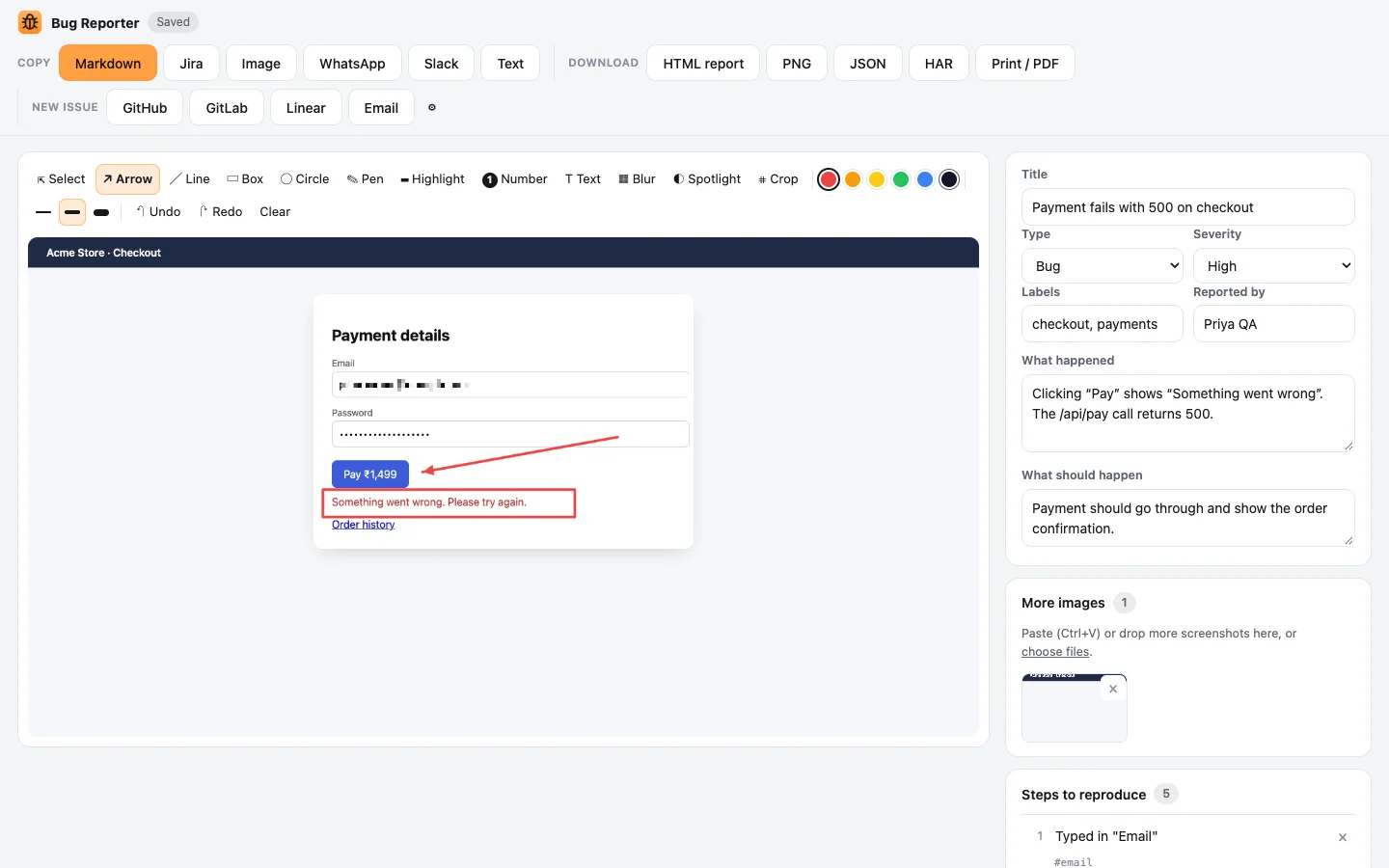
Screenshot — visible, full page or an area
Capture what’s on screen, the whole scrolling page stitched into one image, or just the part you drag over.
Mark it up
Arrows, lines, boxes, circles, pen, highlighter, numbered markers, text and a spotlight. Blur private details, crop, pick thickness, move or delete any mark, undo and redo.
Console logs
Errors, warnings and unhandled promise rejections since the page loaded, with the first lines of the stack — plus info logs when you want them. Searchable.
Network requests
Every fetch/XHR with method, URL, status and time. Failed and slow (3 s+) calls are flagged, with the first part of a failed call’s response. Export as HAR.
Steps & timeline
What was clicked and which fields were filled — by their labels, never their values — with each element’s CSS selector, and one timeline of steps, errors and requests.
Browser, device & speed
URL, browser, OS, screen and window size, language, time zone, theme, CPU/RAM, connection, page load times and JS memory.
Ready to share
Markdown, Jira, Slack, WhatsApp or plain text; an offline HTML file; Print/PDF; PNG; JSON; HAR — or open a prefilled GitHub, GitLab or Linear issue or e-mail.
Private by default
E-mail addresses, card and phone numbers are blanked out at capture; tokens in URLs and failed responses too. Add more screenshots by pasting them in.
Fast to use
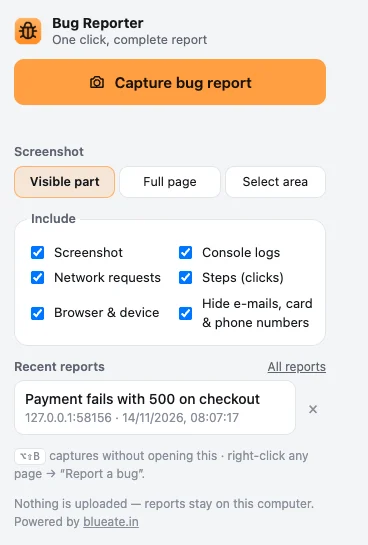
Alt+Shift+B captures straight away, or right-click any page → “Report a bug”. Keep your last 10, 25 or 50 reports; search, export all, or import one a teammate sent.
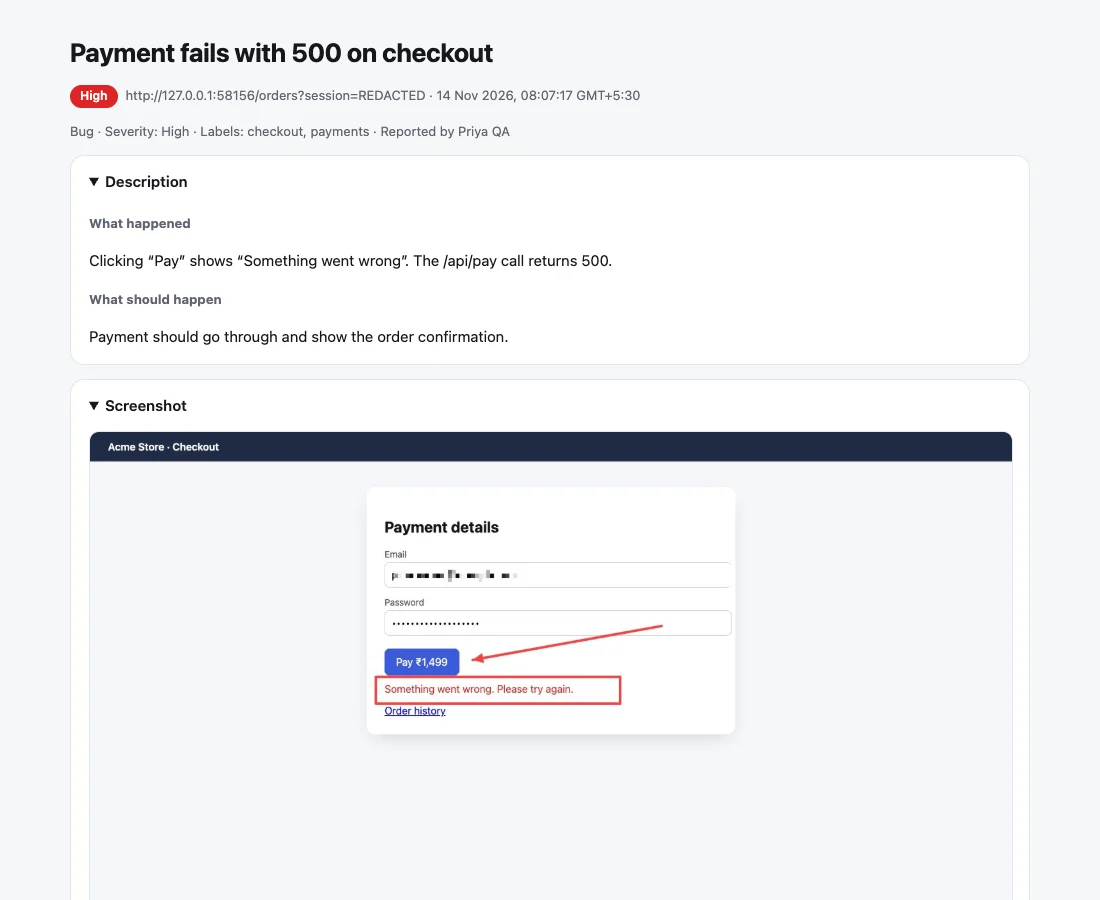
“Copy → Markdown” gives you this — paste it straight into a GitHub issue or Linear, then paste the screenshot with “Copy → Image”. “Copy → Jira” gives the same report in Jira’s wiki format. Secrets in URLs are replaced with REDACTED automatically.
## Payment fails with 500 on checkout

**Severity:** High

**Labels:** checkout, payments

**Steps to reproduce**
1. Typed in "Email"
2. Typed in "Password"
3. Clicked button "Pay ₹1,499"
4. Clicked link "Order history"

**Environment**
| | |
|---|---|
| Browser | Chrome 141.0.7390.54 |
| OS | Windows 10/11 |
| Viewport | 1440×900 |

**Console (2)**
```
[14:06:15] WARN: Deprecated API used: legacyPay()
[14:06:15] ERROR: Payment failed: server returned 500
```

**Failed requests (1)**
| Method | URL | Status | Time |
|---|---|---|---|
| GET | /api/pay?amount=1499&token=REDACTED | 500 | 4 ms |

Response of `GET /api/pay?amount=1499&token=REDACTED` (500):
```
{"error":"card declined by bank","access_token":"REDACTED"}
```- Prefilled GitHub, GitLab and Linear issues, e-mail, Slack and plain-text copy
- HAR download, Print / PDF and a timeline of steps, errors and requests
- Failed calls now show their response (secrets blanked); steps carry CSS selectors
- Line and spotlight tools, line thickness, select/move/delete marks, extra images
- E-mails, card and phone numbers hidden automatically; type, labels and reporter fields
- Reports page: search, keep 10/25/50, export all and import a teammate’s report
- 1Download the zip and unzip it.
- 2Open chrome://extensions (or edge://extensions) and switch on Developer mode, top right.
- 3Click “Load unpacked” and choose the unzipped folder.
- 4Pin Bug Reporter from the puzzle icon. On the page with the bug, click it → “Capture bug report” (or press Alt+Shift+B).
- 5Updating? Unzip over your old folder and press the reload icon on Bug Reporter in chrome://extensions — your saved reports stay.
On a phone? This is an extension for Chrome, Edge or Brave on a laptop or desktop — phones can’t install it. Open this page on your computer.
Bug Reporter makes no network requests at all — no account, no analytics, no server. It never reads cookies or saved site data, never records what you type (only the names of the fields), and blanks out tokens, keys and passwords in URLs and failed responses, plus e-mail addresses, card and phone numbers. “New issue” only opens a prefilled page you submit yourself. Why the browser asks for these permissions:
- Read page activity on sites you visit
- So errors, failed requests and clicks are recorded from the moment a page loads — they can’t be recovered afterwards. It stays in that tab’s memory until you capture.
- Capture the visible tab
- For the screenshot, only when you press “Capture bug report”.
- Storage
- Keeps your last 10, 25 or 50 reports on this computer so you can come back to them (full-page screenshots can be large, so storage isn’t capped).
- Right-click menu
- Adds “Report a bug on this page” to the menu you get when you right-click a page.
- Does it send my data anywhere?
- No. The report is built on your computer and copied or downloaded by you.
- Can it capture the whole page, not just the screen?
- Yes. Choose “Full page” and it scrolls the page, captures each part and stitches them into one image (fixed headers appear once). “Select area” lets you keep just the part with the bug.
- Does it work with Jira?
- Yes. “Copy → Jira” gives Jira wiki text (tables, numbered steps, log block); “Copy → Markdown” suits GitHub, GitLab, Linear and Jira Cloud. Then paste or attach the screenshot.
- Which browsers?
- Chrome, Edge and Brave (Manifest V3).
- Can it hide passwords?
- Yes. Nothing you type is ever recorded — only field names — and you can blur any part of the screenshot. E-mail addresses, card and phone numbers in logs are blanked out at capture, and tokens in URLs and failed responses too.
- Can it file the issue in GitHub, GitLab or Linear for me?
- It opens a prefilled “new issue” page in a tab — title, description, steps, errors and labels filled in — and you check it and press submit there. The extension itself never sends anything and needs no token.
- Can developers get the network data?
- Yes. Failed calls include the first part of their response, every step has the element’s CSS selector, and “Download → HAR” opens in Chrome DevTools, Charles or Fiddler. JSON works for scripts, and a teammate can import your JSON into their own Bug Reporter.
- PDF ToolkitMerge, split, compress, organise, crop, redact, number, watermark, lock or unlock PDFs — and convert to images, Word and text.
- GST Invoice GeneratorMake a clean GST tax invoice with CGST/SGST or IGST, download the PDF and share it on WhatsApp.
- Image Compressor & ResizerShrink photos to a target size, resize, crop and convert between JPG, PNG and WebP — in bulk.
- QR & Barcode GeneratorUPI payment, WhatsApp, website, Wi-Fi, contact and event QR codes, plus product barcodes — styled, checked and print-ready.
- GST CalculatorAdd or remove GST at the new 5, 18 or 40% rates (or any rate) and see the CGST, SGST or IGST split instantly.
- EMI CalculatorMonthly EMI for home, car or personal loans — with total interest, a chart and the full repayment schedule.
Need a tool like this built around your business?
Tell us how it works today. We’ll come back with a clear plan, timeline and estimate — usually within two business days.